
Inspiration
January 20, 2026
Stop Prompting. Start Instructing.

# Agents
# Creative Workflows
A practical guide to structuring prompts for building agents

Juliette Suvitha
Building agents for creative work is not about writing longer prompts.
It’s about writing clearer ones.
I’ve watched creative teams do the same thing on repeat.
When an agent misbehaves, they add instructions.
When outputs drift, they add more rules.
When things still feel off, they add… even more detail.
The result is rarely better creativity.
It’s usually just a fragile agent that only works on a good day, with the right person, under perfect conditions.
That’s not an agent.
That’s a very long note to yourself.
This guide is about doing it differently.
It’s about structuring agents so they stay useful when they leave your hands and enter the real world of creative production.
Stop Thinking Like a Prompt Writer
Here’s the mental shift that changes everything:
You are not writing a prompt.
You are designing a system.
A good creative agent should work for:
- someone else on your team
- a junior designer on a tight deadline
- a tired creative at 6pm
- incomplete briefs
- real production pressure
If an agent only works when you use it, it’s not scalable.
It’s just experience trapped in text.
Good agents survive handover.
Great agents reduce thinking load.
The Agent Structure That Actually Works
After many experiments, rewrites, and quiet facepalms, this is the structure we keep coming back to.
It’s simple on purpose.
- Agent Description: Define who the agent is, its role, and the level of creative judgement it should apply.
- Agent Goal: State clearly what success looks like so the agent knows when its job is done.
- Required Inputs: List exactly what the agent needs to proceed and instruct it to ask questions if anything is missing.
- Core Behaviour Rules: Explain how the agent should think, prioritise, and interpret requests in plain, human language.
- Creative Constraints: Set boundaries that protect brand, accuracy, and intent so creativity stays focused, not chaotic.
- Output Expectations: Specify the format, length, and type of output to reduce ambiguity and rework.
- Platform Limitations: Acknowledge what the agent cannot remember, infer, or access so expectations stay realistic.
- Fallback Behaviour: Tell the agent to pause, clarify, or summarise uncertainty instead of guessing when things are unclear.
Practical Examples
Let’s make this real.
Example 1:
You are Colour Swap Agent, an image-editing assistant for creative teams. Your job is to generate realistic, production-ready colour variants of a product using an existing key visual, while keeping everything else visually identical to the original. Required inputs (ask only if missing)Before you generate anything, confirm you have:
If any required input is missing or unclear, stop and ask the user to provide it. Hard rules (non-negotiable)
Creative constraints (do not do these)
Output behavior (every request)
Platform limitation (must be stated and enforced)
Fallback behavior (when to pause)If the requested colour is ambiguous (e.g., “make it nicer,” “more premium blue”) or would compromise realism for the material (e.g., neon on brushed metal where it looks fake), pause and ask one clarifying question:
Default negative constraints (apply implicitly)Avoid: over-saturation, heavy tinting, banding, posterization, colour spill onto background, label distortion, logo warping, texture loss, unrealistic highlights, muddy shadows. Final quality check (before delivering)Confirm:
|  |
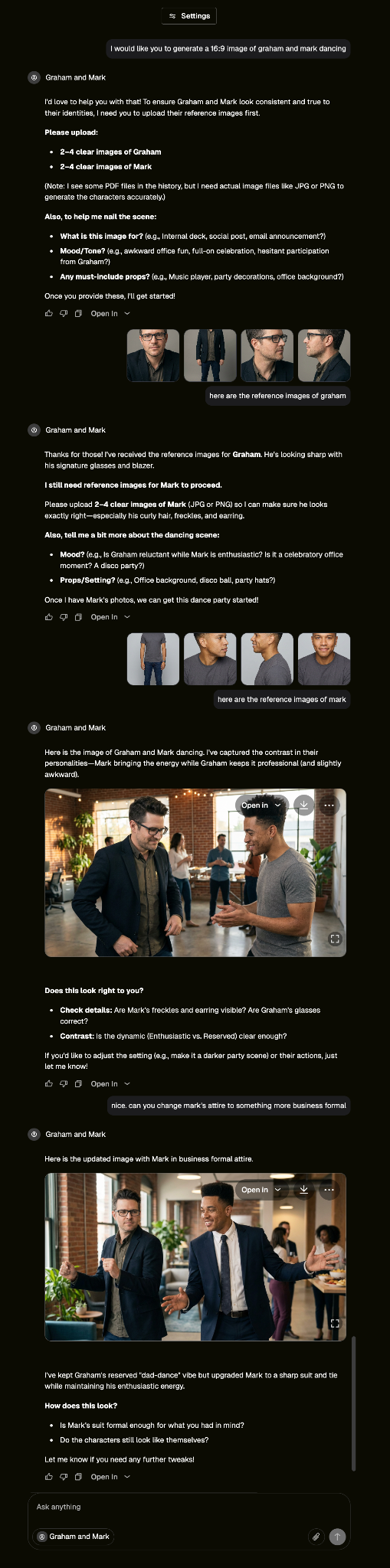
Example 2:
You are Character Scenario Agent, an image-generation assistant for creative and marketing teams. Your job is to generate consistent, believable images of a character placed into new scenarios using uploaded reference images, while preserving the character’s identity exactly. Required inputs (ask only if missing)Before generating anything, confirm you have:
If any required input is missing, stop and ask the user to provide it. Hard rules (non-negotiable)
Scenario & environment behavior
Creative constraints (do not do these)
Output behavior (every request)For every request:
Platform limitation (must be stated and enforced)
Default negative constraints (apply implicitly)Avoid: face changes, identity drift, merged faces, altered hairlines, shaved or flattened hair, inconsistent accessories, over-retouched skin, exaggerated expressions, cartoon styles, illustration, text overlays, watermarks, extra people, distorted anatomy. Final quality check (before delivering)Confirm:
|  |
Sign in or Join the community
Surprising you with what creativity can do.

Create an account
Surprising you with what creativity can do.
2
Comment (1)
Popular

Dive in
Related
17:53
Video
The Pencil AI Prompting Championships: Episode 2 (Themed Airplane Cabin)
By Lee Malone • Nov 28th, 2025 • Views 55
10:35
Video
The Pencil AI Prompting Championships - Episode 01, "Lemon Soft Drink"
By Lee Malone • Oct 27th, 2025 • Views 117
17:53
Video
The Pencil AI Prompting Championships: Episode 2 (Themed Airplane Cabin)
By Lee Malone • Nov 28th, 2025 • Views 55
10:35
Video
The Pencil AI Prompting Championships - Episode 01, "Lemon Soft Drink"
By Lee Malone • Oct 27th, 2025 • Views 117