

The Return: Chat Level Model Switching

# Live
Live: April 21
April 21, 2026You asked, and we listened!
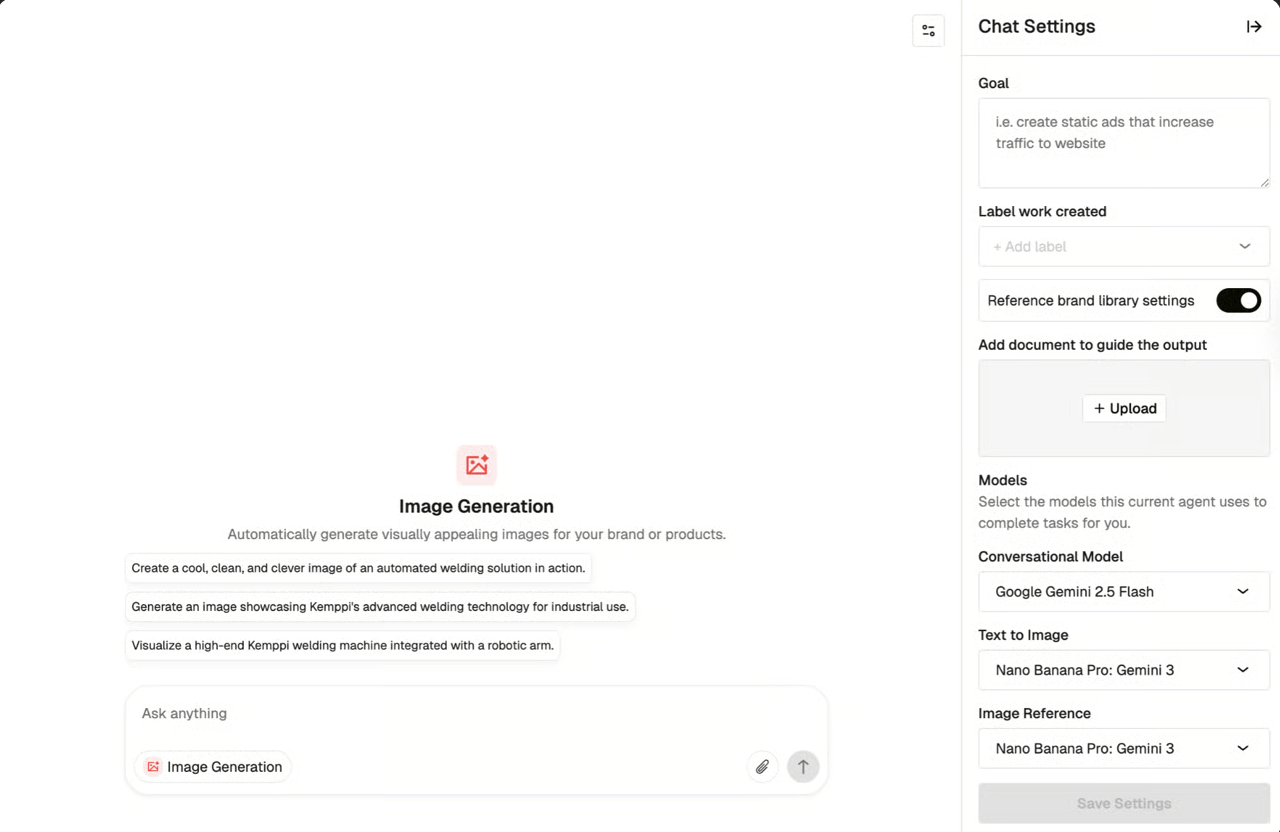
The ability to switch models at the chat level has been reintroduced, resolving the friction of having to edit or duplicate an Agent's underlying configuration just to try a different AI model. You now have the power to override model defaults on the fly directly within your Chat Settings.
What’s New
- Granular, Per-Capability Control: You can now select specific models tailored to individual capabilities (like Conversational or Text-to-Image) directly from the Chat Settings panel.
- Change Models Mid-Conversation: Need a different reasoning style or a different image generator halfway through your task? You can swap models at any point during an active chat session without having to start over.
- Smart Capability Display: The settings panel keeps things clean by only displaying dropdowns for the specific tools enabled on your current Agent.
Where You Can Use It
Chat Level Model Switching is currently supported in the following areas:
Agent Chat
Feeds
Editors
Note: Model switching for agents within Workflows is currently out of scope for this release.
How It Works
Session-Specific Persistence: Your custom model selections apply strictly to the active chat session. Whenever you start a "New Chat," your tool settings will automatically revert to the Agent's default configurations. This ensures your core Agent setup remains untouched.
Comments (0)
Popular

Dive in
Related
Blog
Cursor Chat and Emoji Reactions in Canvas and Workflows
By Victoria Bryer • Jul 14th, 2026 • Views 39
Blog
Cursor Chat and Emoji Reactions in Canvas and Workflows
By Victoria Bryer • Jul 14th, 2026 • Views 39